Text in pictures
How to copy text from an image on a Mac
Updated 23 November 2026 · by Vikas Veshishth
To copy text from an image on a Mac, open the picture in Preview, drag across the words with the pointer and press ⌘C. This is Live Text. It is built into macOS 12 Monterey and later, costs nothing and runs on the Mac.
How do I copy text from a picture in Preview?
- Double-click the image. It opens in Preview.
- Move the pointer over the text. The arrow turns into a text cursor.
- Drag across the words you want. They highlight like text in a document.
- Press ⌘C, then paste anywhere.
Control-click a selection for more: Look Up, Translate, and for phone numbers or addresses, Call or Open in Maps.
The quickest way: Quick Look
You do not have to open the picture. Select the file in Finder and press Space. In the preview that appears, drag across the text and press ⌘C. Press Space again to close it.
Other places Live Text works
- Photos. Open a photo and drag across the text.
- Safari. Drag across text in any image on a web page.
Why can't I select the text?
Four causes cover most cases.
- Live Text is off. Open System Settings, then General, then Language & Region, and turn on Live Text.
- The language is not supported. Live Text reads a fixed list of languages. Apple publishes the list on its macOS feature availability page.
- The text is too small or blurred. Zoom in with ⌘+ and try again. Handwriting works only when it is neat.
- The Mac runs macOS 11 or earlier. Live Text arrived in macOS 12.
How do I get the text from many pictures at once?
Live Text handles one picture at a time. For a batch, the Shortcuts app has an action named Extract Text from Image.
- Open Shortcuts and create a new shortcut.
- Add Select Photos or Get Selected Files in Finder.
- Add Extract Text from Image.
- Add Copy to Clipboard or Append to Note.
Run it and the text of every chosen picture lands in one place.
Copy the text without selecting it, in MacPix
MacPix reads the text in every picture ahead of time. Open a picture, press the info button, and the words are listed under Text in this picture with a Copy text button.
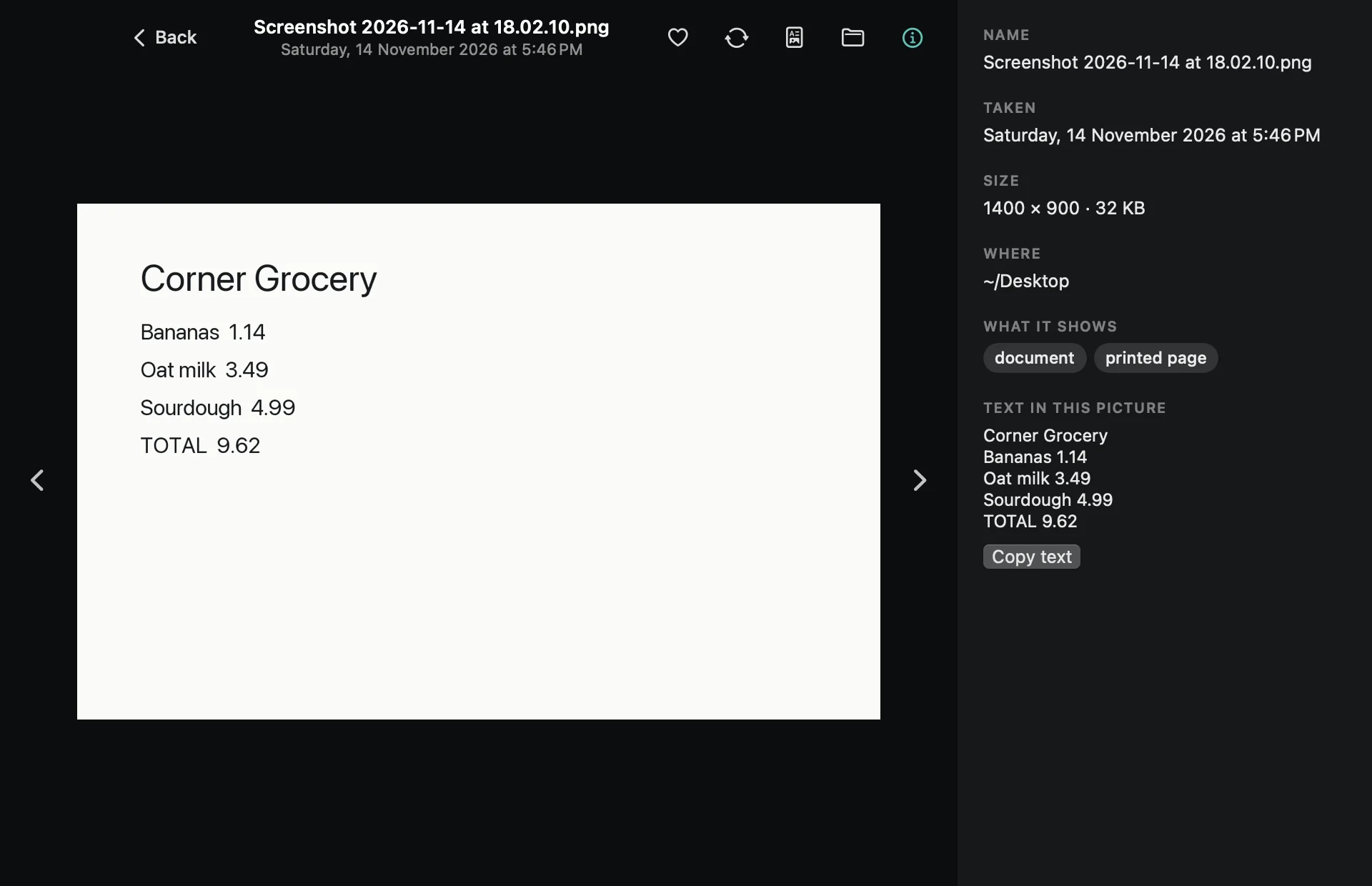
Because the text is already stored, the same words are searchable. Typing sourdough finds this receipt without opening it. MacPix needs macOS 14 or later on an Apple silicon Mac and is not on sale yet.
Questions
Is Live Text free?
Yes. It is part of macOS 12 Monterey and later, with nothing to install or pay for.
Does Live Text send my pictures to Apple?
No. The text recognition runs on the Mac.
Can I copy text from a PDF that is really a scan?
On recent versions of macOS, yes. Open the PDF in Preview and drag across the words. If nothing selects, export the page as an image with File, Export, then open that image.
Does it work on screenshots of videos or games?
Yes. Any picture with readable text works, whatever it is a picture of.
Keep reading
How to search screenshots on a Mac
Find an old screenshot by name, by date, or by the words inside the picture.
PDFHow to turn photos into a PDF on a Mac
Combine photos of receipts, notes or pages into one PDF, in the order you want.
ScreenshotsWhere do screenshots go on a Mac?
The default folder, how to change it, and how to find a screenshot that went missing.