Screenshots
How to search screenshots on a Mac
Updated 23 November 2026 · by Vikas Veshishth
To find a screenshot on a Mac, press ⌘F in Finder, type Screenshot and pick Name matches. To list every screenshot the Mac has ever taken, including renamed ones, run mdfind "kMDItemIsScreenCapture == 1" in Terminal. Searching by the words inside the picture takes one more step, covered below.
How do I find all my screenshots in Finder?
Search for the name. macOS names each one Screenshot, the date, at, then the time, so the word alone finds them.
- Open any Finder window and press ⌘F.
- Type
Screenshot. Under the search field, choose Name matches: Screenshot. - Click This Mac in the bar above the results, so Finder looks everywhere.
- Click the + button on the right to add a rule. Set it to Created date, is within last, and a number of days.
You can type the same search in one line: name:screenshot kind:image.
This fails for any screenshot you renamed. The next method does not.
How do I list every screenshot, even renamed ones?
macOS marks a file as a screen capture when it saves it, and the mark stays after you rename or move the file. Terminal can ask for that mark directly.
mdfind "kMDItemIsScreenCapture == 1"The command prints the full path of every screenshot Spotlight knows about. To see only this year's:
mdfind "kMDItemIsScreenCapture == 1" | grep 2026The second command filters on the path, so it only catches files that still have the year in their name.
Can a Mac search the text inside a screenshot?
Partly. Since macOS Ventura, Spotlight can match words it finds in images through Live Text. Type a distinctive word from the screenshot into Spotlight (⌘Space) and look at the image results.
Three limits make this hard to rely on for screenshots:
- Spotlight does not show which pictures it has read, so a miss can mean "not there" or "not read yet".
- You cannot ask it for screenshots only. Results mix web images, documents and mail.
- It shows the picture but not the text it found, so you cannot check or copy what it read.
The Photos app has the same text search and a Screenshots album under Media Types, but only for pictures you imported into the library. Screenshots you take on the Mac are plain files on the Desktop, so Photos never sees them.
Search the words in every screenshot with MacPix
MacPix reads the text in each picture on your Mac once, on the Mac, and keeps it. After that, typing a word finds the picture.
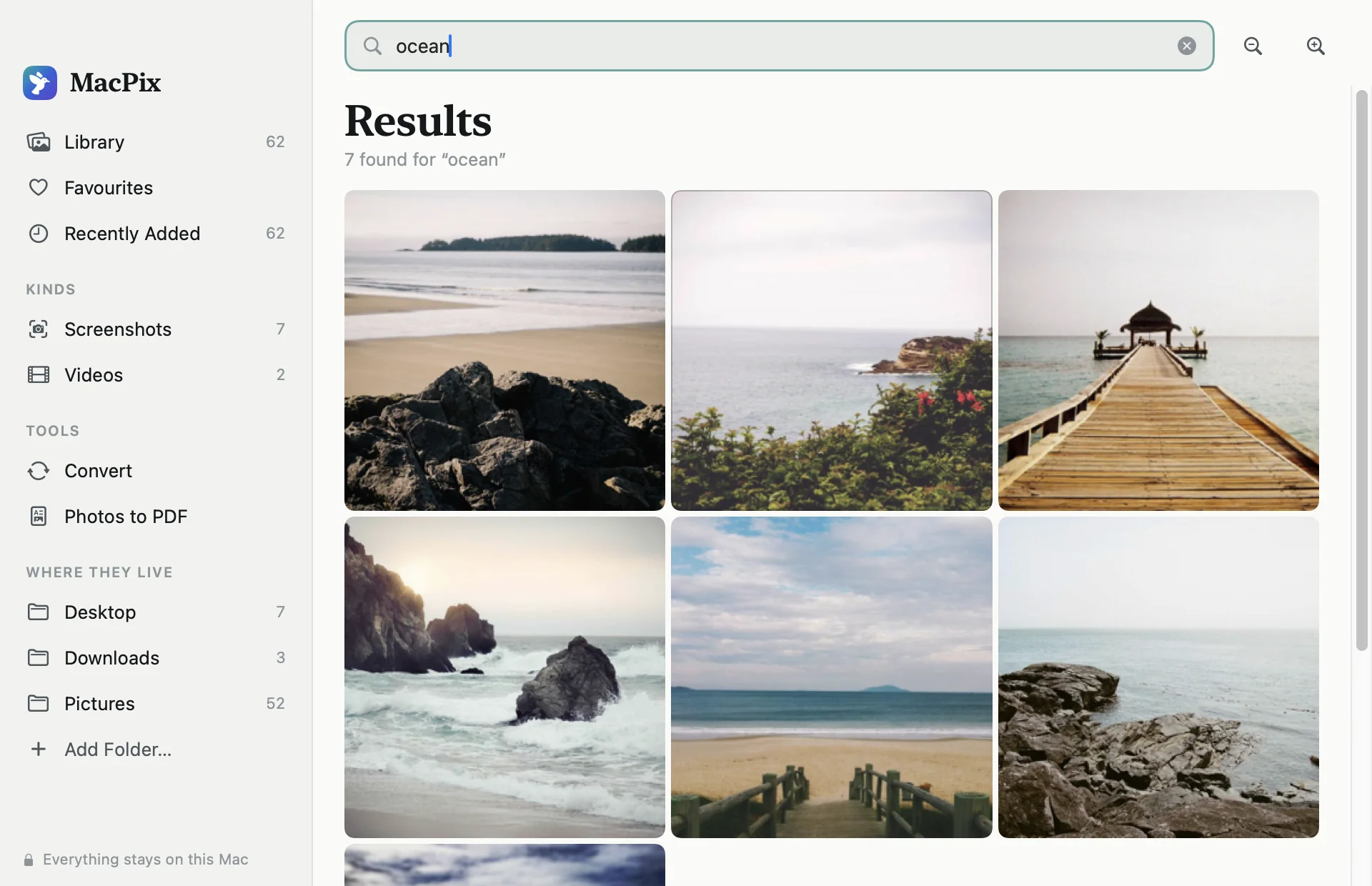
- One list for screenshots. The Screenshots row in the sidebar shows every screen capture from the Desktop, Downloads, Pictures and any folder you add.
- Words inside the picture. Search
total 9.62orseat 7and the receipt or ticket comes up. - What the picture shows. Search
oceanorflowerfor photos with no text at all. - Dates. Add
november 2025to any search to narrow it to that month.
MacPix leaves each file where it is. It needs macOS 14 or later on an Apple silicon Mac and is not on sale yet.
Which way should you use?
| You remember | Use |
|---|---|
| Roughly when you took it | Finder search with a Created date rule |
| Nothing about the name | mdfind "kMDItemIsScreenCapture == 1" |
| A word that was on screen | Spotlight, or MacPix for a complete result |
| What the picture looked like | MacPix picture search |
Questions
Why does Finder not find my screenshot when I search for "Screenshot"?
The file was probably renamed, or your Mac's language is not English, in which case the name starts with a different word. Use the mdfind command above. It looks for the screen-capture mark instead of the name.
Does searching inside screenshots upload them anywhere?
No. Live Text in macOS and the text reading in MacPix both run on the Mac. Neither sends the picture to a server.
Where are screenshots saved in the first place?
On the Desktop, unless you changed it. Where screenshots go on a Mac covers how to check and change the folder.
Can I search screenshots from my iPhone on my Mac?
Yes, if iCloud Photos is on. They appear in the Photos app under Media Types, Screenshots, and Photos search can match the text in them.
Keep reading
Where do screenshots go on a Mac?
The default folder, how to change it, and how to find a screenshot that went missing.
Text in picturesHow to copy text from an image on a Mac
Use Live Text in Preview, Quick Look and Photos to copy the words out of any picture.
PDFHow to turn photos into a PDF on a Mac
Combine photos of receipts, notes or pages into one PDF, in the order you want.